Build Your Own VSCode
You can download a pre-built version of my customized version of VSCode here, and then run:
# MacOS puts a quarantine on application files extracted from zip files
xattr -d com.apple.quarantine /Applications/VSCodium.app
VSCode is a popular code editor that can be customized with community extensions. These extensions can change how the editor works, but they’re limited. The deeper parts of VSCode, like its ElectronJS window system or internal code, are locked away from extensions on purpose.
So, if you want to fully customize VSCode without limits, you’ll need to edit the source code yourself and build your own version. Here’s how to get started:
# Clone the VSCode source code from GitHub
git clone git@github.com:microsoft/vscode.git

# Move into the project folder
cd vscode

# Install the required tools and dependencies
npm install

# Build the code and watch for changes as you edit
npm run watch

# Launch a debug version of your custom VSCode
./scripts/code.sh
This method works well! For example, I submitted a PR to add floating window support on macOS. But not every change gets accepted by the VSCode team at Microsoft. They can’t maintain every new feature, which makes sense.
Sometimes, the changes you want to make don’t fit with how VSCode is designed. Let me show you an example to explain this better.
By default, folding in VSCode looks like this:
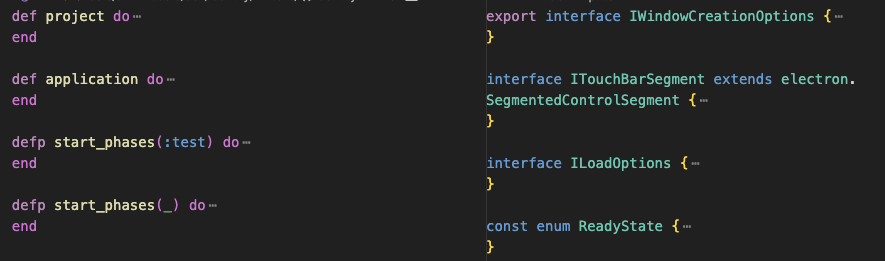
Let’s say you want to tweak how folding works. Here’s a quick (but messy) fix I came up with:
--- a/src/vs/editor/contrib/folding/browser/syntaxRangeProvider.ts
+++ b/src/vs/editor/contrib/folding/browser/syntaxRangeProvider.ts
@@ -20,6 +20,8 @@ const foldingContext: FoldingContext = {

 const ID_SYNTAX_PROVIDER = 'syntax';

+export const FOLD_END_PATTERN = /^\s*\}|^\s*\]|^\s*\)|^\s*end/;
+
 export class SyntaxRangeProvider implements RangeProvider {

 	readonly id = ID_SYNTAX_PROVIDER;
@@ -73,6 +75,13 @@ function collectSyntaxRanges(providers: FoldingRangeProvider[], model: ITextMode
 				}
 				const nLines = model.getLineCount();
 				for (const r of ranges) {
+					if(r.end < nLines) {
+						let endLineContent = model.getLineContent(r.end + 1);
+						if(FOLD_END_PATTERN.test(endLineContent)) {
+							r.end = r.end + 1;
+						}
+					}
+
 					if (r.start > 0 && r.end > r.start && r.end <= nLines) {
 						rangeData.push({ start: r.start, end: r.end, rank: i, kind: r.kind });
 					}
This patch fixes the folding issue, and the result looks like this:
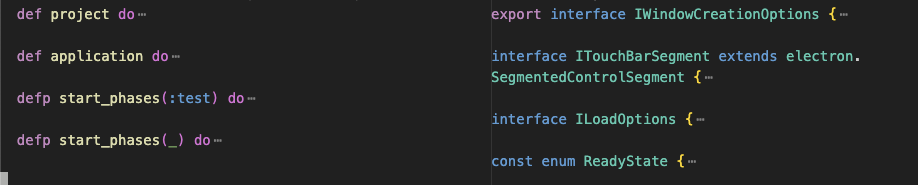
But here’s the catch: this is a hack. The VSCode team probably wouldn’t accept it as a PR because it’s not a clean, long-term solution.
The VSCode source code by default only lets you build a debug version called Code - OSS. This version is limited; it only runs on the computer where you built it.
For a fully working, shareable version, there’s a community project called VSCodium.
VSCodium takes the open-source VSCode code, removes Microsoft branding and telemetry, and adds patches to make it a complete, open-source alternative.
VSCodium uses a script (dev/build.sh) that grabs the VSCode source code, applies custom patches (from patches/*.patch), and builds the editor. Here’s how I built my own version:
# Clone the VSCodium project
git clone git@github.com:VSCodium/vscodium.git

# Check the stable version’s commit hash
cat ./vscodium/upstream/stable.json
# Note the commit hash—it’s the starting point for the patches

# Clone the VSCode source code
git clone git@github.com:microsoft/vscode.git

# Move into the VSCode folder
cd ./vscode

# Switch to the commit hash from stable.json
git checkout "<the commit hash>"

# Create a new branch for your changes
git checkout -b your_branch

# Make your edits and test them here

# Save your changes as a patch file
git diff > ../vscodium/patches/your_patch.patch

# Move back to the VSCodium folder
cd ../vscodium

# Install a required tool (if you’re on macOS)
brew install cmake

# Build the editor (takes 5-10 minutes)
./dev/build.sh

# Find your finished app
ls ./VSCode-darwin-arm64/VSCodium.app
Other Options
- You can build my VSCodium fork, which includes the folding fix and floating window support.
- To enable floating window, add this snippet to your
settings.json:"window.workspacesOverlay": { "enabled": true, "alwaysOnTop": false, "hotKey": "Control+Enter", "snapMode": "bottom" }
- To enable floating window, add this snippet to your
- Or grab the pre-built version here and run:
  # MacOS puts a quarantine on application files extracted from zip files
  xattr -d com.apple.quarantine /Applications/VSCodium.app